



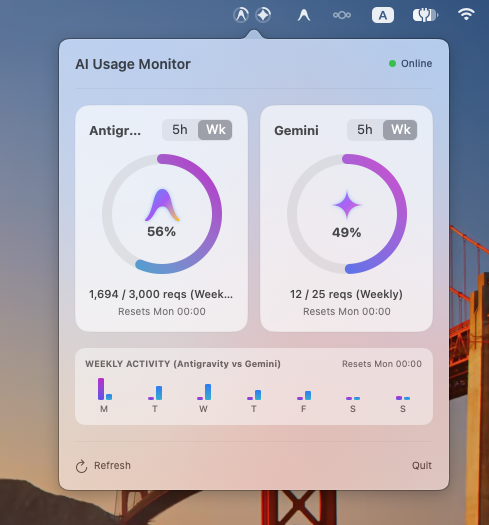
Gemini & Antigravity Usage Menu Bar is a lightweight, native macOS menu bar status item and popover widget built to track your 5-hour rolling request window and weekly quotas for both Google Antigravity IDE and Gemini.
Built completely with SwiftUI, AppKit, and custom vector rendering, it draws twin circular monochrome gauges that seamlessly blend into your macOS menu bar alongside system icons like Wi-Fi, Battery, and Control Center.
Key Features
- Circular Menu Bar Gauges: Dual progress rings drawn dynamically right on the macOS status bar with centered vector SVG logos (Antigravity emblem & Google Gemini 4-point sparkle star). Rendered as native macOS template images so they adapt automatically to light and dark menu bars.
- Accurate 5-Hour Rolling Tracker: Automatically reads and parses local agent interactions from
~/.gemini/*/brain/*/.system_generated/logs/transcript.jsonl, calculating real-time remaining countdown until the oldest request slot clears (Reset in: 12m 45s). - Weekly Allocation & 7-Day Chart: Aggregates activity across each day of the week (Monday through Sunday) and renders comparative daily bar charts directly inside the popover.
- Interactive Metric Toggle: Switch any gauge card between 5-Hour and Weekly views with a single click.
- Built-in Launch at Login: Toggle auto-start directly in the popup HUD with zero configuration or terminal commands.
- Zero Dock Clutter: Configured as an
LSUIElementaccessory application living purely in your menu bar. - Zero Third-Party Dependencies: 100% native Swift standard library and Apple system frameworks (
AppKit,SwiftUI,Combine).
Installation & Setup
Option A: Download Pre-built App (Recommended)
- Download the latest release zip: GeminiUsageBar Release.
- Extract and move
GeminiUsageBar.appto your/Applicationsfolder. - Because this is an open-source project without a paid Apple Developer certificate, remove Gatekeeper quarantine if macOS prompts:
xattr -cr /Applications/GeminiUsageBar.app - Launch the app—the live gauges will appear immediately in your menu bar!
💡 Tip: Left-click the menu bar icon to reveal the floating popover HUD with charts and countdowns. Right-click the icon to trigger manual refresh, open settings, or exit.
Option B: Build from Source
- Clone the repository:
git clone https://github.com/muradjabir/gemini_usage_menubar.git cd gemini_usage_menubar - Build the optimized release binary:
swift build -c release - Launch the background process:
./.build/release/GeminiUsageBar &
Architecture & Internals
The application is organized into modular native Swift components:
GeminiUsageBar.swift: Application entrypoint and lifecycle management viaNSApplicationDelegate.StatusBarController.swift: Manages theNSStatusItem, dynamic template icons, andNSPopoverpresentation.MenuBarGaugeRenderer.swift: Vector graphics engine generating status bar gauge rings and emblems.PopoverContentView.swift: Main interactive SwiftUI HUD layout with daily charts and status summaries.CircularGaugeCardView.swift: Reusable circular gauge component featuring segmented metric toggles.BrandLogos.swift: Pure CoreGraphics Bézier path definitions for Antigravity and Gemini logos.RealUsageProvider.swift: Engine that parses local JSONL transcript trajectories and computes rolling time windows.UsageStore.swift: Reactive state store with automatic 30-second polling and second-by-second countdown ticking.